Extracting Projections from Non‐Planar Views
If required, you can extract a non-planar projection as a 2D image for archiving or for further processing. This option is available in the Shape and Patch contextual menus.
How to Extract a Projections from a Non-Planar View
-
Do one of the following:
- Right-click the sphere or cylinder from which the projection was unwrapped.
- Right-click the patch from the curved plane was extracted.
- Choose Extract Projection of Structured Grid in the pop-up menu.
-
Select the required structured grid in the Choose a Structured Grid to Extract dialog, as shown below.
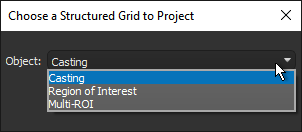
Note The structured grids you can extract data from include image data, regions of interest, and multi-ROIs.
-
Click OK to extract the projection.
When extracted, the new object appears in the Data Properties and Settings panel.
